What Is ‘Use as Reference’ on Instagram Reels?
Learn how Instagram Reels' Use as reference feature works, including its 90-second limit, current availability, recording steps, and differences from Remix.
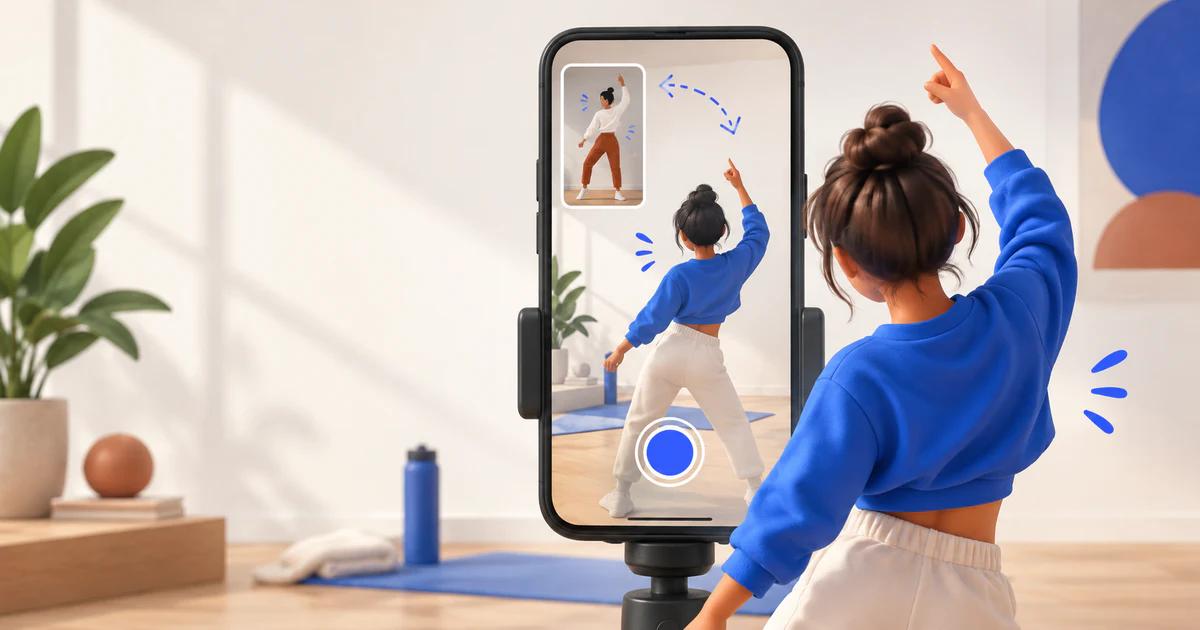
Instagram has introduced a Reels creation feature called Use as reference. It lets you keep another Reel visible in a small, movable window while recording your own video. You can replay or pause the reference clip to follow an action, match a beat, or line up a shot without switching between screens.
The feature is best understood as a recording aid. It helps creators observe another Reel during filming instead of automatically adding that Reel to the finished video.
How to Use a Reel as a Reference
The publicly reported steps are straightforward:
- Open a Reel that is shorter than 90 seconds.
- Tap the three-dot menu on the Reel.
- Select Use as reference.
- The Reel will open in a small window inside the Instagram camera.
- Move, pause, or replay the reference window as needed.
- Use the countdown to prepare, then record your own Reel.
Current reporting says the option is available only in the iOS version of Instagram. If you cannot find it, first check that you are using an iPhone and that the source Reel is under 90 seconds.
The available announcement does not provide a complete Android release date, regional availability list, or rollout schedule for every account. A missing option therefore does not necessarily mean there is a problem with your account.
Use as Reference vs. Remix
Use as reference and Remix both begin with an existing Reel, but they are designed for different jobs.
Feature | Main purpose | How the original content is used |
|---|---|---|
Use as reference | Follow an action, pace, or composition while recording | The original Reel appears as a small reference window in the camera interface |
Remix | Create a response, collaboration, or derivative Reel | The original photo or video can appear in a split-screen, picture-in-picture, green-screen, or sequential layout |
Meta's official Remix documentation explains that Remix can incorporate a public photo or video into a new Reel and offers several layouts. By comparison, the current description of Use as reference focuses on watching the source clip while recording.
The announcement does not clearly explain whether the reference clip appears in the finished Reel or whether attribution is added automatically. Until that behavior is confirmed, creators should not assume that Use as reference works like Remix or handles credit in the same way.
When Could This Instagram Reels Feature Be Useful?
Use as reference may help when you want to:
- follow a dance or exercise demonstration;
- match movements or cuts to the timing of another Reel;
- record a spoken response while reviewing the original point;
- recreate a camera angle, transition, or composition;
- follow a short tutorial while filming your own steps.
Its main purpose is synchronization during recording. It is not described as a tool for downloading or directly editing the source video.
Does Using a Reference Give You Permission to Copy a Reel?
No. A creation feature inside Instagram does not automatically give you permission to copy, republish, or commercially use someone else's work outside the uses supported by the platform.
Creators should still avoid presenting another person's work as their own or using protected material without the rights required for that use. If your Reel is clearly inspired by another creator, giving appropriate credit is generally more transparent than hiding the source.
Copyright and commercial-use requirements depend on the content, location, and intended use. An Instagram feature is not a substitute for permission when permission is required.
What If You Only Want to Watch Public Reels?
Use as reference is a creation feature inside the Instagram app. If you only want to browse Reels posted by a public account, you can use GramPeek's Instagram Reels Viewer in a web browser.
If you need to save a public Reel and a usable public video URL is available, you can also try the Instagram Reels Downloader. GramPeek works only with publicly accessible content. It cannot open private accounts or bypass Instagram's access controls.
The Short Answer
Instagram Reels' Use as reference feature keeps another Reel visible in a movable camera window while you record. The reference player can be paused and replayed, and a countdown can help you synchronize your recording.
Unlike Remix, the feature is focused on observing and aligning with the original Reel during filming. Current reporting says it is limited to iOS and works with Reels shorter than 90 seconds. Availability on other devices and accounts remains unclear until Instagram provides more rollout details.
Sources
- Instagram Creators: original Use as reference announcement
- Social Media Today: Meta adds audio links and reference Reels to Edits
- Meta: Introducing New Ways to Collaborate and Create With Reels
Continue with GramPeek
Explore public Instagram content
Written by GramPeek Editorial Team. This article explains publicly reported Instagram features and does not imply affiliation with Instagram or Meta.